Changes to already published translations
Imported from Confluence (source, last edited 2015-05-11). Screenshots are the old UI — flag for GIF/clip re-capture.
Changes may be done to already published descriptions in their acceptability, case sensitivity and description status (active/inactive). However, description text cannot be changed. Should this be required, the description should be retired and a new one created. The description type cannot be changed, i.e., a synonym cannot become a text definition or a fully specified name. The fields for the description text and description type appear grayed out and no actions are allowed.
Step-by-step guide
-
Click the pencil icon (
 ) to open the edition window.
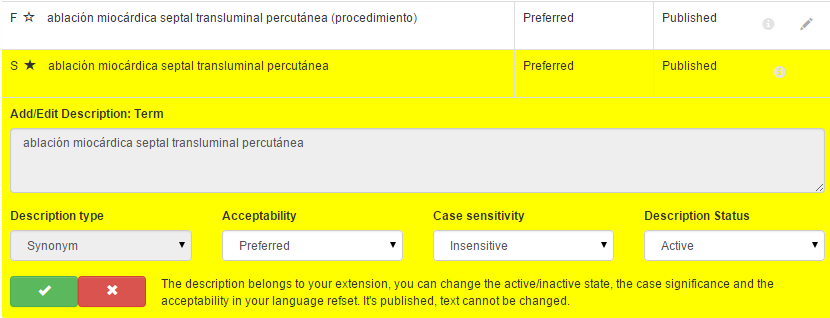
-
Open **Acceptability **to change Acceptability to Acceptable, Preferred or Not Acceptable
-
Open Case sensitivity to change case sensitivity to Sensitive or Insensitive.
-
Open Description status to change Description Status to Active or Inactive
Warning:
When a description is inactivated, Acceptability should always be changed to 'Not acceptable'
5. Select the Green checkmark to accept changes.
- Click Save, otherwise any changes will be lost.