Adding a text definition
Imported from Confluence (source, last edited 2015-05-13). Screenshots are the old UI — flag for GIF/clip re-capture.
Text definitions are useful for further specifying concept generic and differential characteristics. The steps for creating a new text definition are similar to those described in Adding synonyms, but the description type displayed will be ‘Text definition’.
Step-by-step guide
-
In the Concept Editor, press Edit concept to open the working window
-
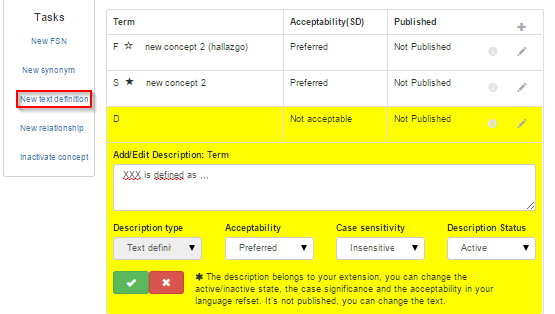
Click New text definition to display the text field to enter the new text definition.
-
Type the new text definition in the text field and define its case sensitivity.
Info:
Text definitions <u>always</u> have 'Preferred' acceptability and should always be capitalized.
4. Select the Green checkmark to accept the text definition.
-
Click Save, otherwise the new text definition will be lost.
